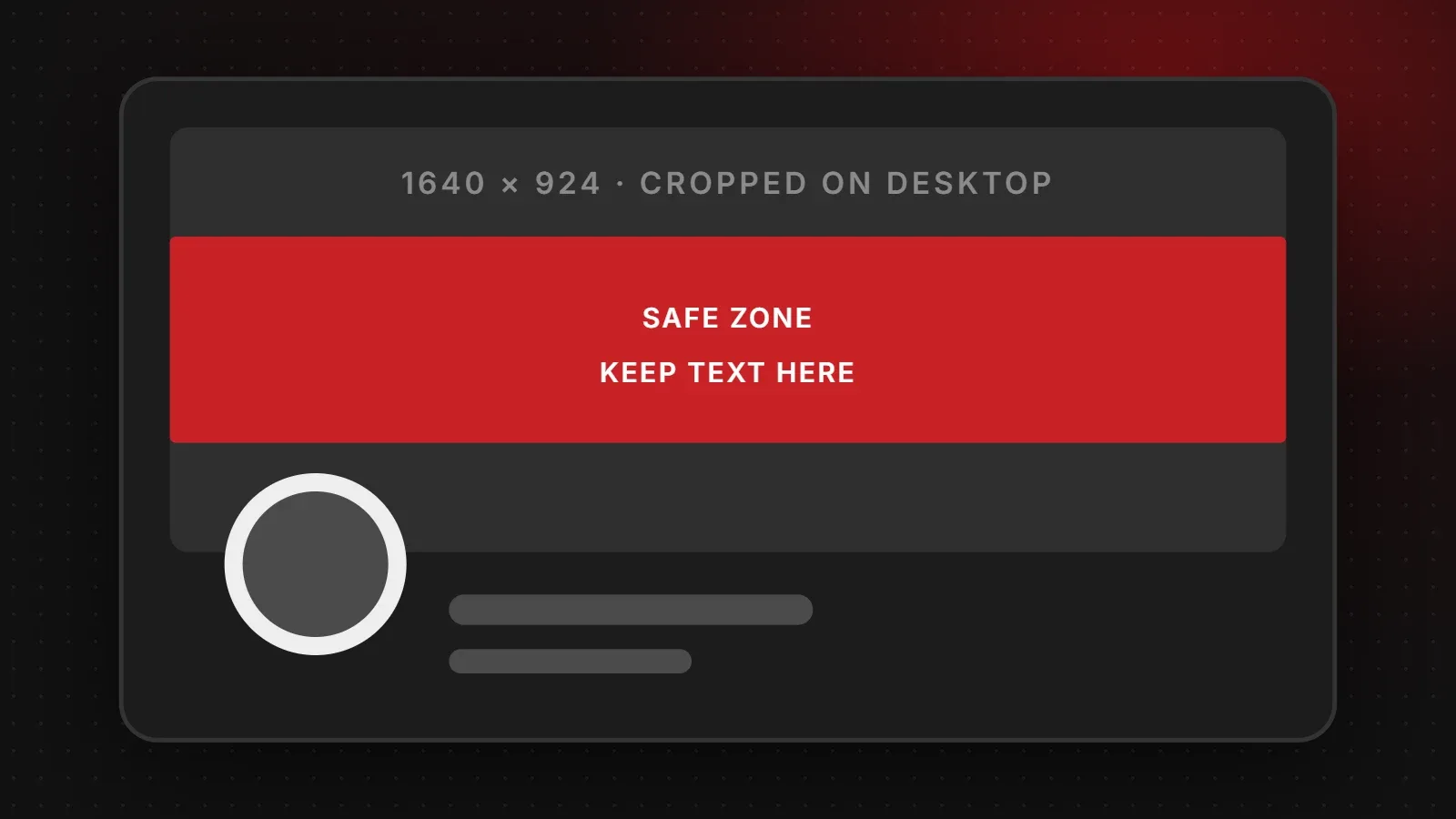
The safest Facebook cover photo size is 1640 x 924 pixels (a 16:9 image), with all text and logos kept inside the central 1640 x 624 pixel band. Mobile phones show the full 16:9 image, while desktops crop the top and bottom into a wider strip, so this approach works on both. The classic size of 851 x 315 pixels still works for desktop-only designs. This guide explains why covers get cropped and gives sizes for pages, profiles, groups and events.
- Design at 1640 x 924 and keep important content in the middle band so desktop and mobile both look right.
- Your profile picture covers the bottom-left area, so keep that corner empty.
- Groups and events use different shapes: 1640 x 856 for groups and 1920 x 1005 for events.
Facebook cover photo size chart
| Cover type | Recommended size | Notes |
|---|---|---|
| Page or profile cover (desktop and mobile) | 1640 x 924 px | Keep text in the central 1640 x 624 band |
| Page or profile cover (classic) | 851 x 315 px | Looks right on desktop, crops on mobile |
| Minimum upload | 400 x 150 px | Too small for a sharp result; avoid |
| Group cover | 1640 x 856 px | Roughly 1.91:1 |
| Event cover | 1920 x 1005 px | Roughly 1.91:1 |
Meta does not publish one fixed cover size for every screen, and the layout changes from time to time. The sizes above are what designers use because they survive the cropping on both desktop and mobile.
Why your Facebook cover gets cropped
Facebook shows the same cover image in two different shapes. On a computer, the cover appears as a wide strip, about 820 x 312 pixels. On a phone, it appears closer to a 16:9 rectangle, about 640 x 360 pixels. A single image cannot match both shapes exactly. As a result, one of the two views always crops something.
The fix is to upload a 16:9 image, which phones show in full, and accept that desktops will trim the top and bottom. If all your important content sits in the middle band, nothing important is lost.
The safe zone for text and logos
- Vertical: keep text within the middle 624 pixels of a 924-pixel-tall design (about 150 pixels clear at the top and bottom).
- Bottom-left corner: your round profile picture overlaps the cover here on most layouts. Keep it free of text.
- Right edge on mobile: buttons can sit close to the edge, so leave a margin of about 80 pixels.
Facebook group and event cover sizes
Group covers work best at 1640 x 856 pixels. Group members often visit on phones, so keep the group name and any rules or dates in the centre. Event covers work best at 1920 x 1005 pixels. Put the date, time and venue in large, clear text, because the event image also appears small in people's event lists and notifications.
Facebook cover design tips for businesses
- Say what you do in a few words, for example "Custom leather jackets, delivered across Pakistan".
- Show your product or team rather than generic stock photos.
- Match your brand colours and fonts with your website and Instagram.
- Add a current offer during sales, then switch back to your standard cover afterwards.
- Save as PNG if the cover has text or a logo, so the edges stay sharp.
Frequently asked questions
What is the best Facebook cover photo size?
1640 x 924 pixels, with text kept in the central 1640 x 624 band so it shows on both desktop and mobile.
Is 851 x 315 still the right size?
It still works on desktop, but phones show a taller crop, so the sides of an 851 x 315 image get cut off on mobile.
Why does my cover look blurry?
The image is probably too small or saved as a heavily compressed JPG. Upload a larger PNG for designs with text.
What size should a Facebook event cover be?
1920 x 1005 pixels, with the key details in the middle.
Want a cover that matches your brand?
For the other post and Story sizes, see our Facebook image sizes guide. Our branding and creative team designs Facebook covers, profile images and post templates that match your website, and our social media team can keep your page fresh every month. Get in touch.
Written by the ItsWebExpert team, a web design and development company in Karachi building websites, online stores and apps for businesses across Pakistan.
Ask a Question on WhatsApp