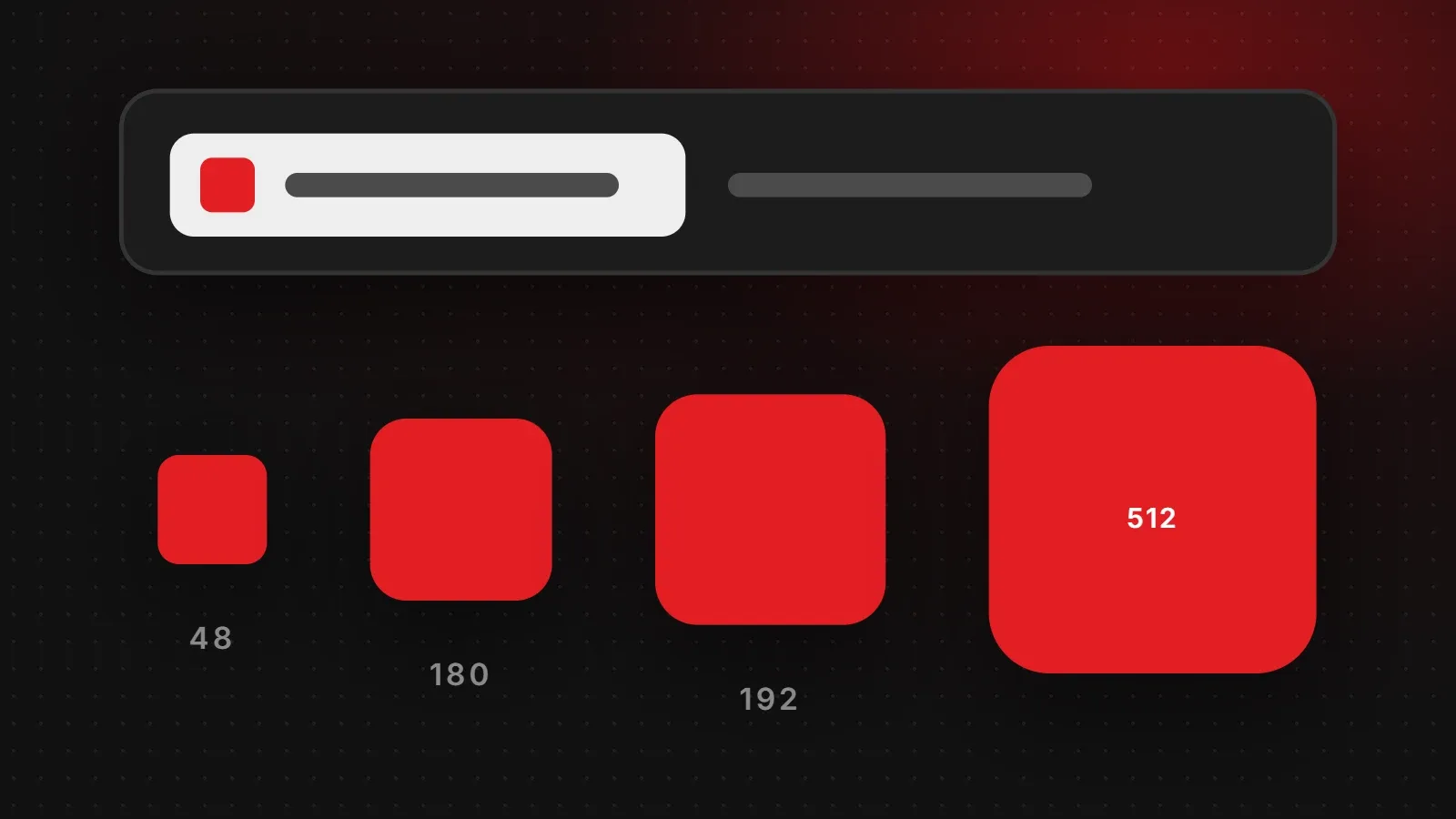
A favicon is the small icon that appears in browser tabs, bookmarks, Google search results and on phone home screens. You do not need dozens of sizes. For a modern website, the right favicon size set is just four files: a 48 x 48 favicon (or SVG/ICO), a 180 x 180 Apple touch icon, and 192 x 192 and 512 x 512 icons for Android and web apps. This guide explains each size, gives you the exact code to add them, and covers why a favicon sometimes does not appear in Google.
- Your favicon must be square. Google recommends making it larger than 48 x 48 pixels.
- Four files cover browsers, Google, iPhone and Android: 48, 180, 192 and 512 pixels.
- Keep the design simple. A single letter or symbol reads better than a full logo at tiny sizes.
Favicon size chart
| File | Size | Used for |
|---|---|---|
| favicon.ico or favicon.svg | ICO with 16, 32 and 48 px inside, or SVG | Browser tabs and bookmarks |
| favicon-48.png | 48 x 48 px (or 96 x 96) | Google search results, Windows shortcuts |
| apple-touch-icon.png | 180 x 180 px | iPhone and iPad home screen |
| icon-192.png | 192 x 192 px | Android home screen, web app manifest |
| icon-512.png | 512 x 512 px | Android splash screen, web app manifest |
Start by designing one square master image at 512 x 512 pixels, then export the smaller sizes from it.
Favicon size requirements for Google search
Google shows your favicon next to your site name in mobile and desktop results, so it is one of the first things people see. According to Google's favicon guidelines:
- The favicon must be square (1:1).
- Google recommends a favicon larger than 48 x 48 pixels so it looks good on high-resolution screens.
- Add the favicon link in the
<head>of your home page, and use one favicon per website. - Google must be able to crawl both your home page and the favicon file, so do not block them in robots.txt.
- The icon should represent your brand and must not be inappropriate.
The HTML code to add a favicon
Upload the files to the root folder of your website and add these lines inside the <head> section of every page:
<link rel="icon" href="/favicon.ico" sizes="any">
<link rel="icon" href="/favicon.svg" type="image/svg+xml">
<link rel="icon" href="/favicon-48.png" sizes="48x48" type="image/png">
<link rel="apple-touch-icon" href="/apple-touch-icon.png">
<link rel="manifest" href="/site.webmanifest">
If you do not need an SVG version, simply leave out that line. The site.webmanifest file lists the 192 and 512 pixel icons for Android:
{
  "name": "Your Business Name",
  "icons": [
    { "src": "/icon-192.png", "sizes": "192x192", "type": "image/png" },
    { "src": "/icon-512.png", "sizes": "512x512", "type": "image/png" }
  ]
}
How to add a favicon in WordPress
- Go to Appearance > Customize > Site Identity.
- Under Site Icon, upload a square image of at least 512 x 512 pixels.
- Crop if needed and click Publish.
WordPress creates the smaller sizes and adds the code for you. On Shopify, go to Online Store > Themes > Customize > Theme settings > Favicon. Wix and Squarespace have a similar option in their site settings.
Favicon design tips
- Use a symbol, not a full logo. At 16 or 32 pixels, words become unreadable. Use your initial or logo mark.
- Use strong contrast. The icon should be clear on both light and dark browser tabs.
- Fill the square. Leave only a small margin so the icon does not look tiny next to other sites.
- Avoid thin lines and gradients, which disappear at small sizes.
- Give the Apple icon a solid background. iPhones may show transparent areas in black, so a coloured background looks cleaner.
Why your favicon is not showing
- Browser cache: browsers keep old favicons for a long time. Open the site in a private window or clear the cache.
- Wrong path: check that the file opens directly, for example
yourdomain.com/favicon.ico. - Not square: Google ignores favicons that are not 1:1.
- Google has not updated yet: Google says recrawling and updating a favicon can take several days to several weeks. You can speed this up by requesting indexing of your home page in Google Search Console.
- Blocked by robots.txt: make sure Google can crawl the favicon file and home page.
Frequently asked questions
What size should a favicon be?
Square, and larger than 48 x 48 pixels for Google. A practical set is 48, 180, 192 and 512 pixels.
Is 16 x 16 still a valid favicon size?
Browsers still use 16 x 16 in tabs, but an ICO or SVG file handles it automatically. Do not use a 16 x 16 file as your only favicon.
Should a favicon be PNG or ICO?
Use both: an ICO (or SVG) for browsers, plus PNG files for Google, Apple and Android.
How long does it take for a favicon to show in Google?
Anywhere from several days to several weeks, depending on when Google recrawls your home page.
Need a favicon and logo that work everywhere?
A favicon is part of your brand identity. Our branding and creative team designs logos with a matching icon version for favicons, apps and social media, and our web development team sets them up correctly on your site. Contact us to get started.
Written by the ItsWebExpert team, a web design and development company in Karachi building websites, online stores and apps for businesses across Pakistan.
Ask a Question on WhatsApp