In short: use WebP for most website images, JPG for photos when WebP is not supported, PNG for graphics that need a transparent background or sharp text, AVIF when your platform supports it and you want the smallest files, and SVG for logos and icons. This JPG vs PNG vs WebP guide explains how each format works, when to use it, and how much space each one saves.
- WebP is usually the best all-round choice for websites in 2026.
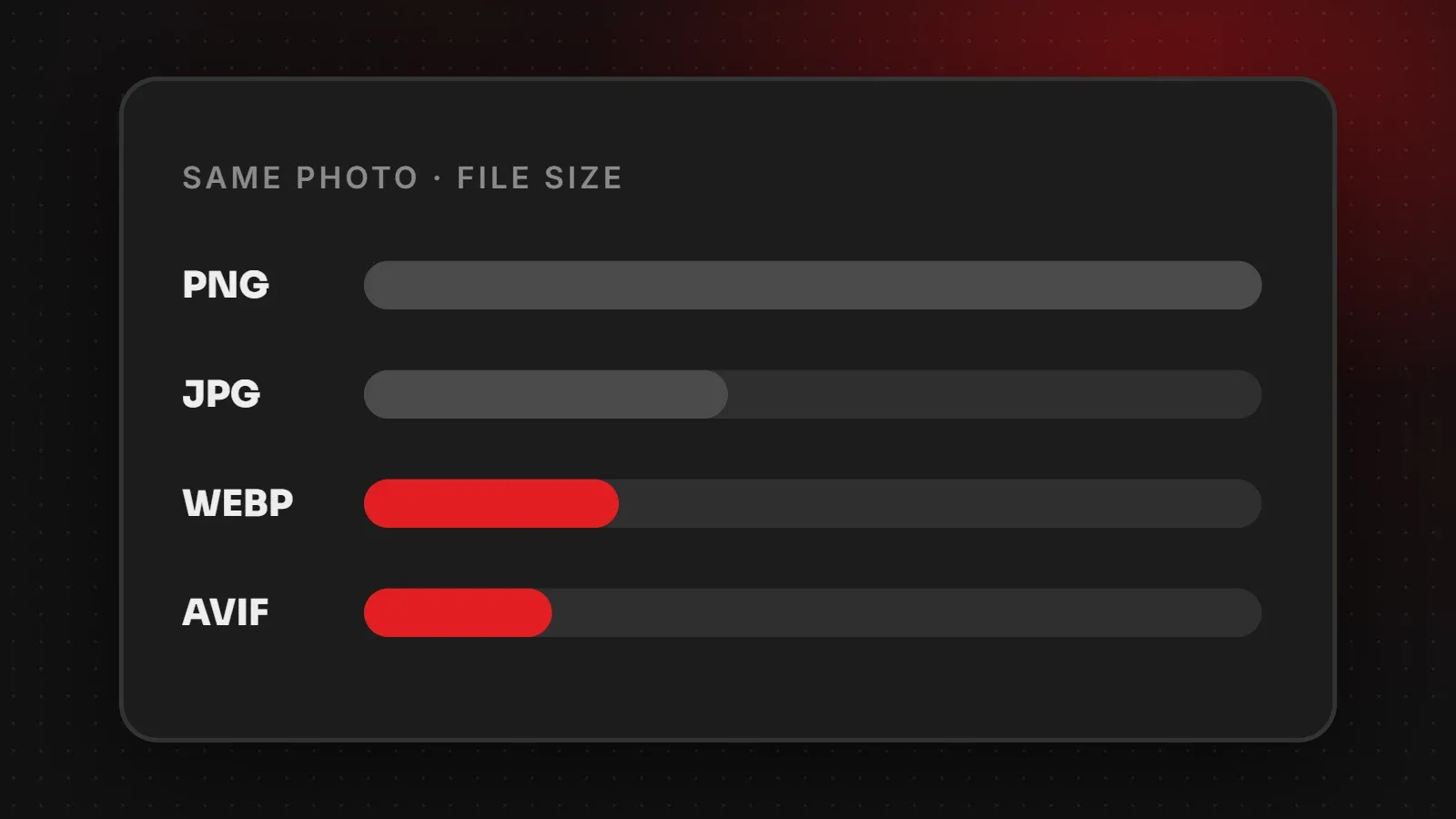
- PNG is not for photos. It can make a photo several times larger than JPG or WebP.
- Use SVG for logos and icons so they stay sharp on every screen.
JPG vs PNG vs WebP vs AVIF at a glance
| Format | Compression | Transparency | Best for |
|---|---|---|---|
| JPG (JPEG) | Lossy | No | Photos, especially for email and older systems |
| PNG | Lossless | Yes | Logos with transparency, screenshots, graphics with text |
| WebP | Lossy or lossless | Yes | Almost every image on a website |
| AVIF | Lossy or lossless | Yes | The smallest photos where supported |
| SVG | Vector (not pixels) | Yes | Logos, icons, simple illustrations |
| GIF | Lossless, 256 colours | Basic | Very simple animations (video is usually better) |
Lossy vs lossless: what it means
Lossy formats (JPG, and WebP or AVIF in lossy mode) throw away detail the eye barely notices, which makes files much smaller. Lossless formats (PNG, and lossless WebP) keep every pixel exactly, which is great for sharp text and flat colours but makes photos large.
JPG: the classic photo format
JPG works everywhere, from old phones to email apps and printing services. It is good for photos but cannot keep a transparent background, and repeated editing and saving slowly reduces quality. However, for photos on a modern website, WebP gives the same quality at a smaller size.
PNG: for transparency and sharp graphics
PNG keeps hard edges and text crisp and supports transparent backgrounds, so it suits logos, icons, screenshots and product cut-outs. The downside is size: a photo saved as PNG can be three to five times larger than the same photo as JPG.
WebP: the best default for websites
WebP, created by Google, is supported by all modern browsers. It usually produces files around 25 to 35 percent smaller than JPG at similar quality, and it supports transparency like PNG. As a result, one format can replace both JPG and PNG on most websites. WordPress has supported WebP uploads since version 5.8. See Google's WebP documentation for technical details.
AVIF: even smaller files
AVIF often makes photos smaller than WebP at the same quality, and modern browsers support it. However, it takes longer to encode, and some older apps, editors and platforms still cannot open it. Use AVIF if your website platform or image plugin creates it automatically, with WebP or JPG as a fallback.
SVG: for logos and icons
SVG is not made of pixels. Instead, it stores shapes as code, so it stays perfectly sharp at any size and is usually tiny. Use it for logos, icons and simple illustrations. Do not use it for photos.
Which image format should you use?
- Website photos: WebP (or AVIF with a fallback).
- Logo on your website: SVG, or PNG/WebP if you only have a pixel version.
- Product photos on a white background: WebP.
- Product cut-outs with transparency: WebP or PNG.
- Screenshots with text: PNG or lossless WebP.
- Email newsletters: JPG and PNG, because some email apps still do not show WebP.
- Printing: high-quality JPG, PNG or PDF as your printer asks.
Whatever format you choose, size and compression matter too. Read our website image size guide and our guide to compressing images without losing quality.
Frequently asked questions
Is WebP better than JPG?
For websites, yes in most cases. WebP gives similar quality at a smaller file size and supports transparency.
Is PNG better quality than JPG?
PNG is lossless, so it keeps every detail, but for photos the difference is rarely visible and PNG files are much larger.
Should I use AVIF?
Use AVIF if your platform supports it with a fallback. Otherwise WebP is the simpler choice.
Which format is best for logos?
SVG for websites. Use PNG when a platform does not accept SVG.
Want your website images optimised automatically?
Our speed and performance team converts and compresses every image on your site and sets up modern formats with fallbacks, so pages load fast without any extra work for you. Ask for a free image audit.
Written by the ItsWebExpert team, a web design and development company in Karachi building websites, online stores and apps for businesses across Pakistan.
Ask a Question on WhatsApp